Works

Risk Identifier

Operational Readiness Dashboard
An illustrative sketch of a flower

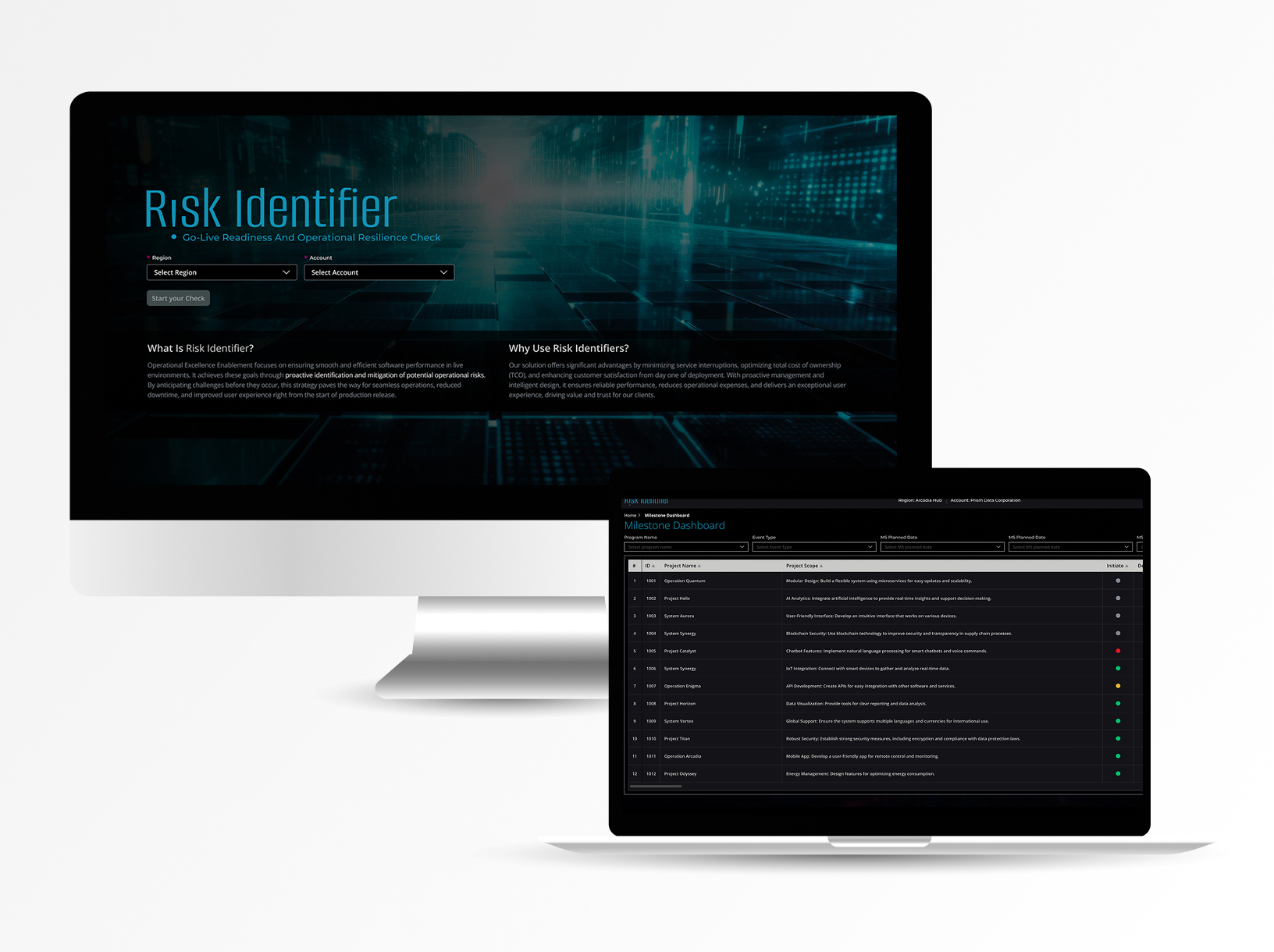
Risk Identifier shows how ready a product is for real-world use by surfacing key risks early, with a clear Operability Score.

Role: UX/UI Product Designer & Researcher

Led design as the solo designer, collaborating closely with the UX/UI manager, project manager, and front-end/back-end development teams | Amdocs 2024-2025

Business problem

Fragmented project tracking forced leaders to chase manual updates across emails and Gantt charts for dozens of projects, hiding risks until budgets overran and deadlines missed—costing time, money, and customer trust.

What was the challenge?

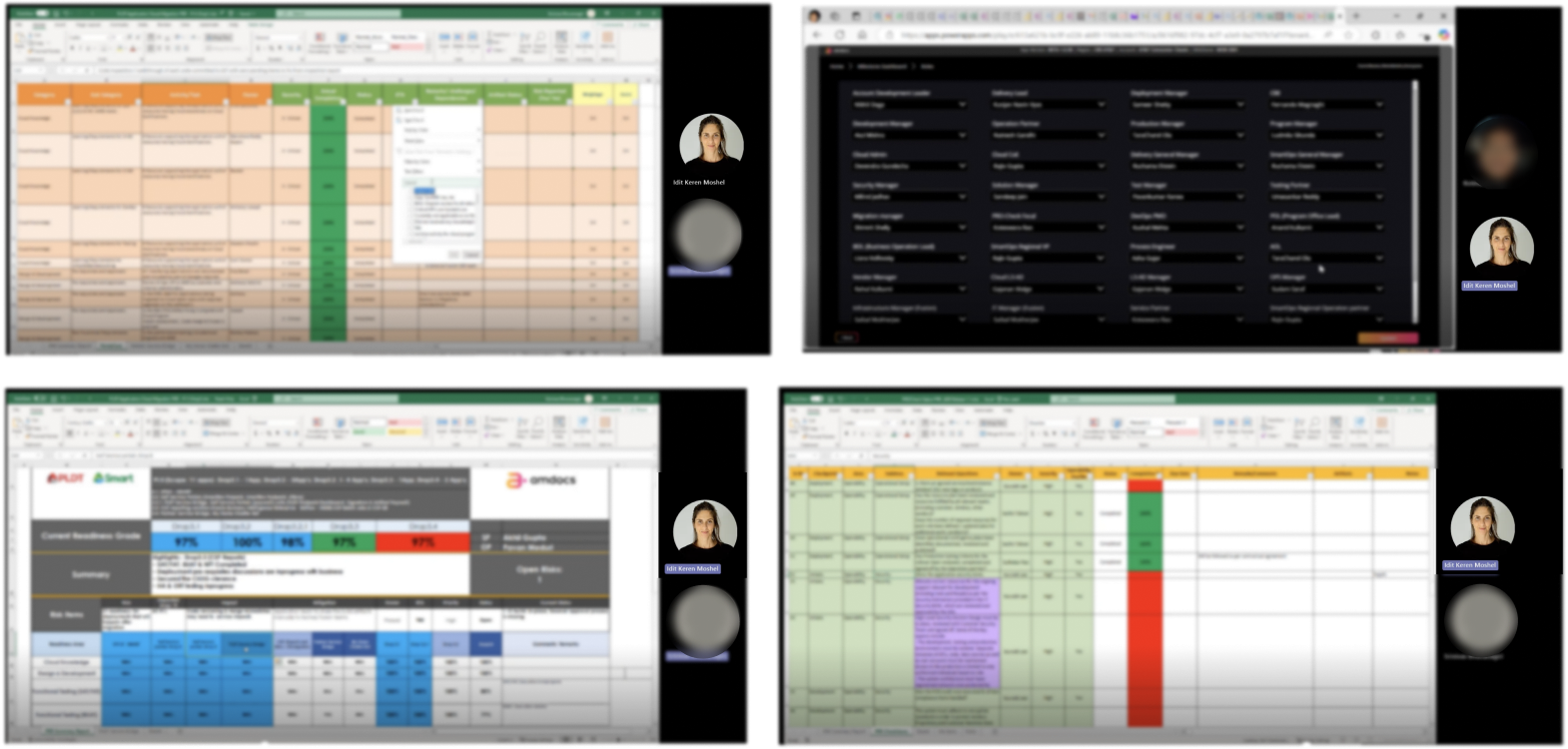
Senior stakeholders managed dozens of parallel projects using Excel Gantt charts and manual status emails, making it impossible to understand true delivery risk. Risks only surfaced late—when deadlines slipped or budgets overran—leaving no time to allocate critical resources like architects or QA.

What was the aim?

Create a unified dashboard that consolidates milestones by phase (Init, Dev, QA, etc.) across all projects, giving leaders real-time risk visibility and enabling proactive resource allocation before problems escalate.

What were the requirements?

Focus

Moving towards Operability

Questions

Templates based

Tools

Driven by PowerApps tool

(digitization & automation)

Standardization

Integrated within the process, this framework ensures Agile compliance.

Ownership

Accountability – Service Partner

Responsibility - Operation Partner

Coverage

3 Milestones

What was the process?

Question Bank (QB)

Best practices QB

QB modification based on Lesson Learn

Ongoing QB maintenance

Meta Data Collection

Release Type

Release Date

Stakeholders

Timelines

Checkpoints

Risk Identifier Execution

Check list from QB based on release type

Checklist execution across phases

Raise risk in Account Risk Register

Additional question can be added by account

Risk Management

Review risks in account Risk Register

Mitigate/Accept risk as per account GBD Risk Management Process

Approve completion/release post Risk Assessment

Who are the users?

Portfolio Manager

Juggling budgets across teams with no real-time view—wants consolidated milestones to catch overruns before they hit financials.

VP Engineering

Tracks 30+ projects daily but drowns in Excel Gantts and email updates—needs one dashboard to spot risks early and prioritize architects.

Resource Lead

Gets frantic "urgent" requests when QA bottlenecks emerge—needs phase-by-phase visibility to allocate her team proactively.

CTO

Senior exec who needs cross-project risk signals at a glance to brief the board, not chase manual status reports.

Time for research

I used three research methods:

1. User Interviews

Direct conversations with users to understand their goals, workflows, and pain points in real-world contexts.

2. Card Sorting

A research method used to Reveal how users group and label information.

3. Usability Test

Observing users as they complete tasks to identify usability issues and validate design decisions.

1 . User Interviews

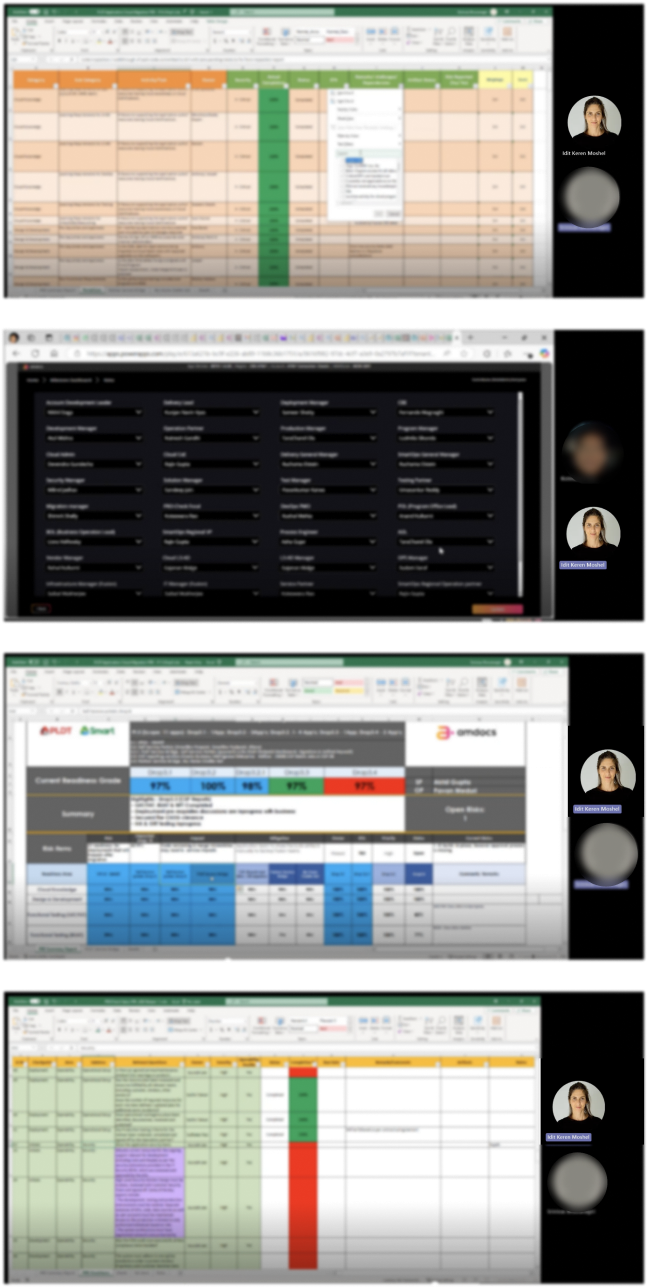
I interviewed Excel Gantt users to uncover daily tracking pain points.

2. Card Sorting

Organized user interview pain points and needs into clear categories.

Efficiency

"I'm frustrated by unexpected issues that arise after the product launch, which could have been prevented with better planning."

Efficiency

"I feel disconnected from development and doubt my needs are considered, causing product dissatisfaction."

Complexity

I'm overwhelmed by the complexity of this Excel file that multiple people are working on."

Complexity

Big Excel file is causing confusion and making it hard to find the information I need." -split to 2 sentence

Trust

"The system feels unstable, slowing my tasks and hurting productivity."

Visualization:

Clear Visualization: "I find it hard to understand the workflow because the map is cluttered and not intuitive."

3. Usability Test- Success Criteria

Goal: Validate Users easily find projects relevant info without workarounds.

Efficiency - Preventing Post-Launch Issues

Participant identifies missing QA resources

Participant notices database migration hasn't started

Participant recognizes stale status update

Disconnected from Development

Participant locates their requirement

Participant identifies lack of progress/closure

Participant can escalate or add follow-up

Complexity - Finding Information

Participant uses search/navigation to find project

Participant identifies who last updated the data

Time to find information: < 90 seconds

Visualization - Cluttered Workflow Maps

Participant views workflow visualization

Participant identifies QA Testing bottleneck

Participant understands dependencies

Exploring Early Directions

Initial Testing Mockups and Design Alternatives

Checkpoint Management Assessment (Product Requirement)

Original product sketch: Users had to fill dense panels with stacked forms and tables for checkpoint assessments- too cramped, no clear sequence, and required manual matching post-entry.

My redesign

Turned this into a guided 3-step flow: input → auto-validation → smart linking with previews, making assessments intuitive and error-proof.

Checkpoint Management Assessment

Details

Area

Dev Readiness

Sub Area

Scope & Capacity

Severity

Critical

Delegate Owner

ADL

Question Owner Role

ADL

Question Creator

Tom Hirsh

Question Description

Is Business Readiness R&R (Roles and Responsibilities) agreed and signed off with all parties? (incl. Business Optimization, Business Realization, Org. Change. Mgmt, Business Process Integration,Business Configuration Tables (incl. RT or BPT or EPC or PC - which is relevant )

Is Mandatory

Assessment

Planned Completion %

100

Actual Completion %

100

Gap %

100

Approver

Select Date

Approval Status

Approval in Progress

Assessment Status

In Progress

ETA

Select Date

Actual Completion Date

Select Date

Comments

Is Business Readiness R&R (Roles and Responsibilities) agreed and signed off with all parties? (incl. Business Optimization, Business Realization, Org. Change. Mgmt, Business Process Integration,Business Configuration Tables (incl. RT or BPT or EPC or PC - which is relevant )

*

Approver Comments

Is Business Readiness R&R (Roles and Responsibilities) agreed and signed off with all parties? (incl. Business Optimization, Business Realization, Org. Change. Mgmt, Business Process Integration,Business Configuration Tables (incl. RT or BPT or EPC or PC - which is relevant )

*

Approver Comments

Is Business Readiness R&R (Roles and Responsibilities) agreed and signed off with all parties? (incl. Business Optimization, Business Realization, Org. Change. Mgmt, Business Process Integration,Business Configuration Tables (incl. RT or BPT or EPC or PC - which is relevant )

PLS provide a reason

No Artifact

Artifact as Link

Artifact as File

Risk Management

Present Risks

Save Changes

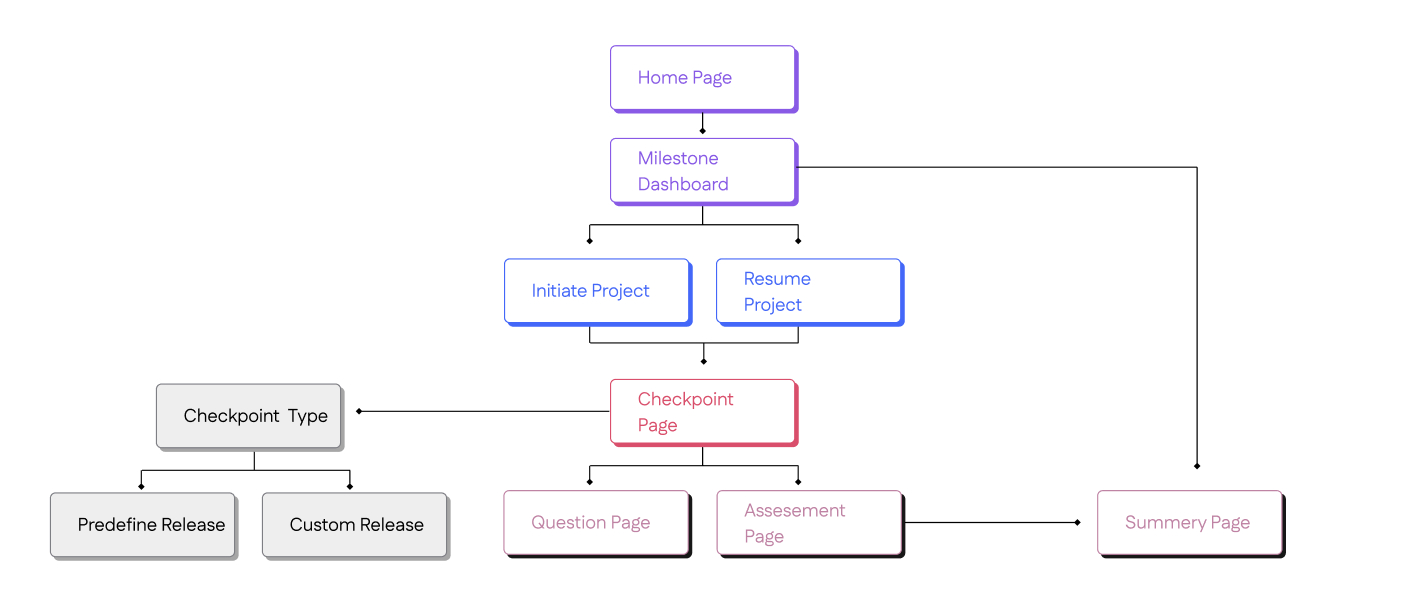
Information Architecture

Before starting design, I created an Information Architecture to organize user flows, clarify component relationships, establish scalable patterns, and align stakeholders early.

UX/UI Design Decisions

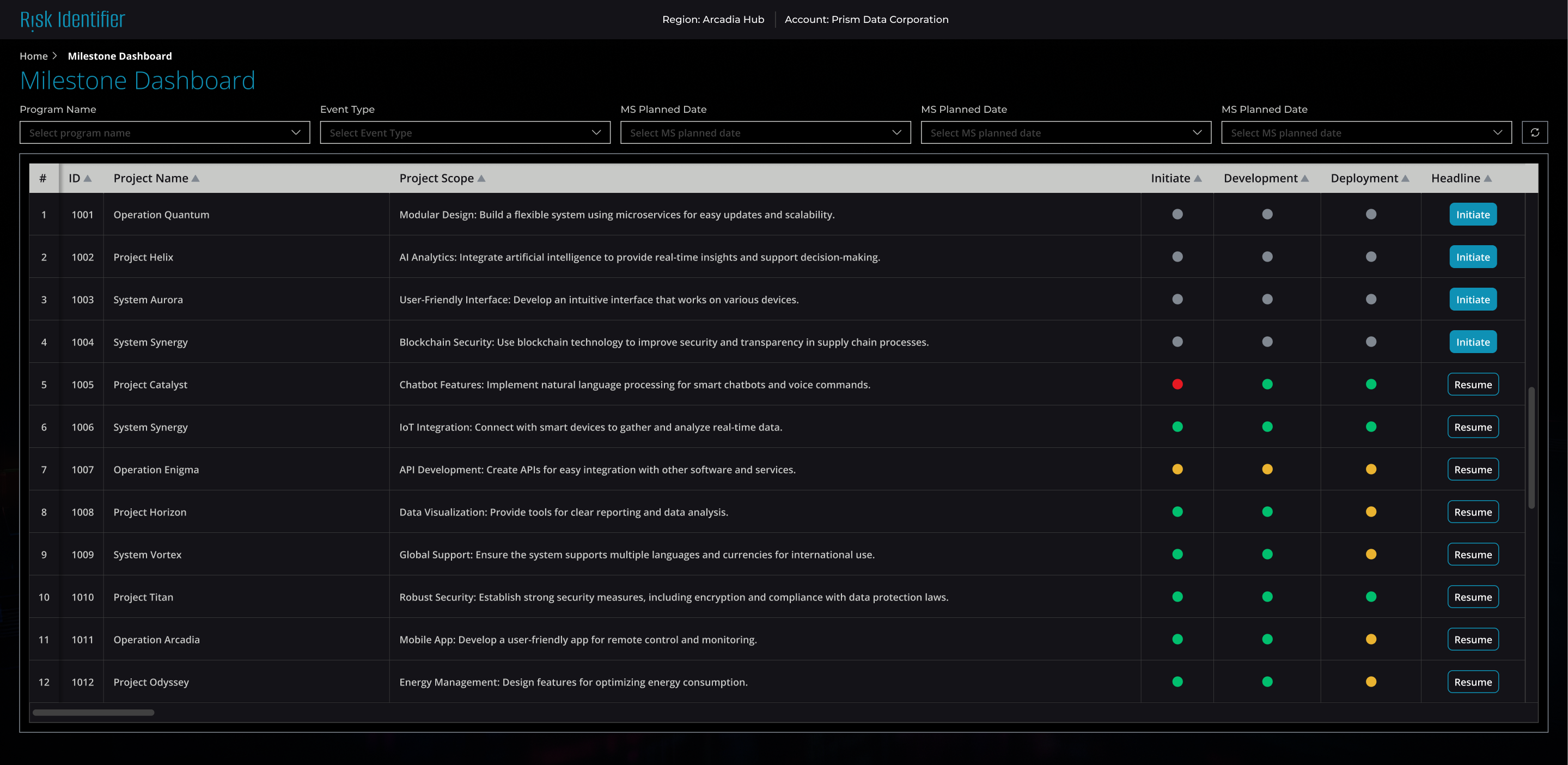
  • Overview first, details on demand—executives stay high-level while PMOs drill into specifics when needed.
  • Color-coded indicators let users scan dozens of projects in seconds and spot critical issues instantly.
  • Pre-populated checkpoints and dropdowns minimize manual entry and cognitive load during setup.
  • Clear hierarchy with alternating rows, filters, and right-aligned actions for quick scanning and decisions.

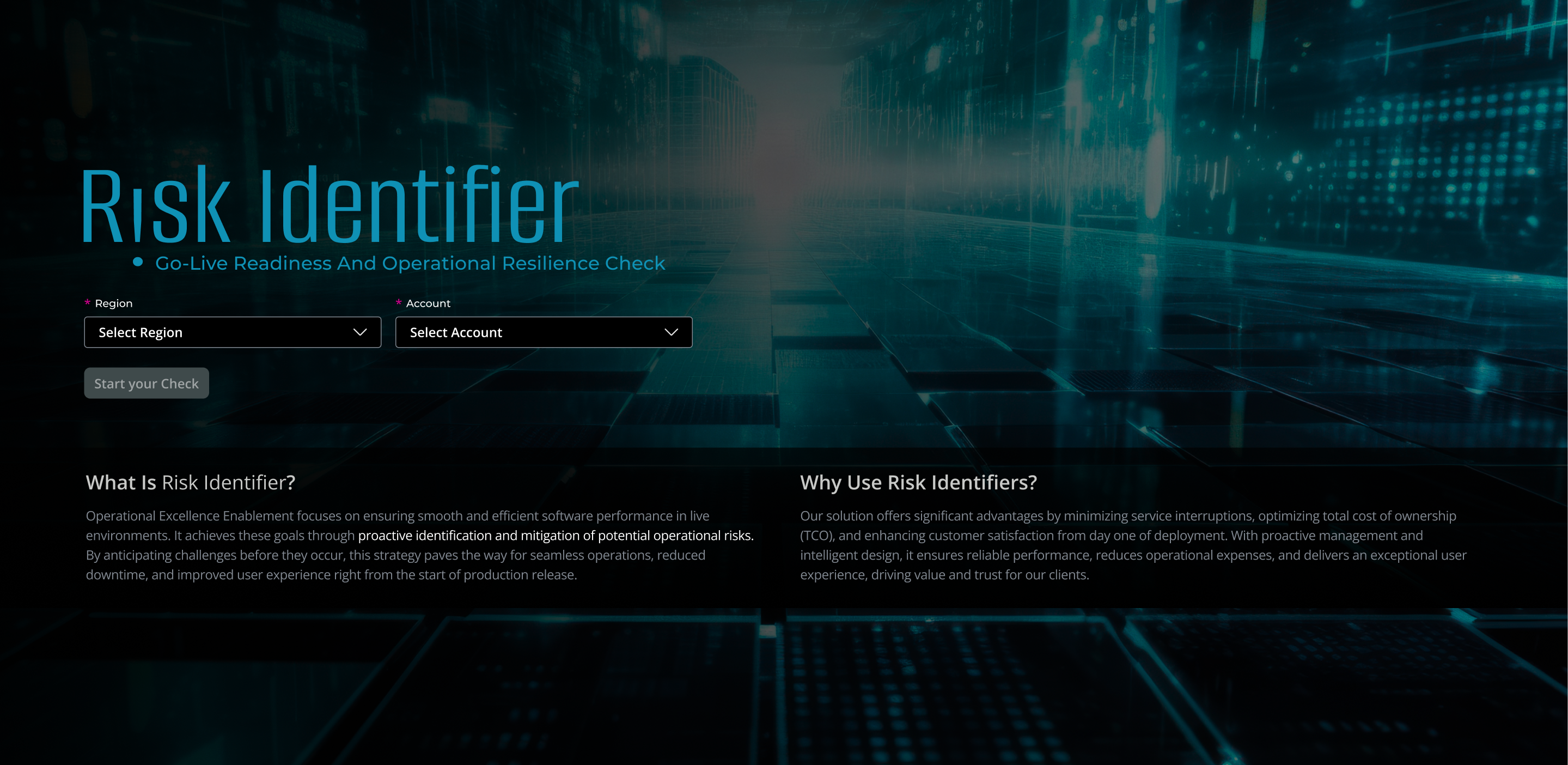
Entry Screen

This entry screen is designed to set context, build confidence, and guide users into action with minimal friction.

Dashboard:

This dashboard exists to give executives and PMOs a single place to see milestone health and delivery risk across all active projects, so they can intervene early, prioritize decisions, and keep the portfolio on track

Setting Up a Project Checkpoint:

This screen is designed to help users initiate a project checkpoint quickly, accurately, and with minimal cognitive load.

Summary & Readiness View:

Gives executives a quick overview of all projects at a glance. Drill down for details when needed.

Outcome

  • Reduced Risk Discovery Time
  • Proactive Resource Allocation- resources (architects, QA) are assigned before deadlines slip, not after—preventing last-minute firefighting and budget overruns.
  • Single Source of Truth--Eliminated fragmented status updates across multiple Excel files and email chains
  • Improved Stakeholder Confidence

Works

Risk Identifier

Operational Readiness Dashboard

An illustrative sketch of a flower

Risk Identifier shows how ready a product is for real-world use by surfacing key risks early, with a clear Operability Score.

Role: UX/UI Product Designer & Researcher

Led design as the solo designer, collaborating closely with the UX/UI manager, project manager, and front-end/back-end development teams | Amdocs 2024-2025

Business problem

Fragmented project tracking forced leaders to chase manual updates across emails and Gantt charts for dozens of projects, hiding risks until budgets overran and deadlines missed—costing time, money, and customer trust.

What was the challenge?

Senior stakeholders managed dozens of parallel projects using Excel Gantt charts and manual status emails, making it impossible to understand true delivery risk. Risks only surfaced late—when deadlines slipped or budgets overran—leaving no time to allocate critical resources like architects or QA.

What was the aim?

Create a unified dashboard that consolidates milestones by phase (Init, Dev, QA, etc.) across all projects, giving leaders real-time risk visibility and enabling proactive resource allocation before problems escalate.

What were the requirements?

Focus

Moving towards Operability

Questions

Templates based

Tools

Driven by PowerApps tool

(digitization & automation)

Standardization

Integrated within the process, this framework ensures Agile compliance.

Ownership

Accountability – Service Partner

Responsibility - Operation Partner

Coverage

3 Milestones

What was the process?

Question Bank (QB)

Best practices QB

QB modification based on Lesson Learn

Ongoing QB maintenance

Meta Data Collection

Release Type

Release Date

Stakeholders

Timelines

Checkpoints

Risk Identifier Execution

Check list from QB based on release type

Checklist execution across phases

Raise risk in Account Risk Register

Additional question can be added by account

Risk Management

Review risks in account Risk Register

Mitigate/Accept risk as per account GBD Risk Management Process

Approve completion/release post Risk Assessment

Who are the users?

Portfolio Manager

Juggling budgets across teams with no real-time view—wants consolidated milestones to catch overruns before they hit financials.

VP Engineering

Tracks 30+ projects daily but drowns in Excel Gantts and email updates—needs one dashboard to spot risks early and prioritize architects.

Resource Lead

Gets frantic "urgent" requests when QA bottlenecks emerge—needs phase-by-phase visibility to allocate her team proactively.

CTO

Senior exec who needs cross-project risk signals at a glance to brief the board, not chase manual status reports.

Time for research

I used three research methods:

1. User Interviews

Direct conversations with users to understand their goals, workflows, and pain points in real-world contexts.

2. Card Sorting

A research method used to Reveal how users group and label information.

3. Usability Test

Observing users as they complete tasks to identify usability issues and validate design decisions.

1 . User Interviews

I interviewed Excel Gantt users to uncover daily tracking pain points.

2. Card Sorting

Organized user interview pain points and needs into clear categories.

Efficiency

"I'm frustrated by unexpected issues that arise after the product launch, which could have been prevented with better planning."

Efficiency

"I feel disconnected from development and doubt my needs are considered, causing product dissatisfaction."

Complexity

I'm overwhelmed by the complexity of this Excel file that multiple people are working on."

Complexity

Big Excel file is causing confusion and making it hard to find the information I need." -split to 2 sentence

Trust

"The system feels unstable, slowing my tasks and hurting productivity."

Visualization:

Clear Visualization: "I find it hard to understand the workflow because the map is cluttered and not intuitive."

3. Usability Test- Success Criteria

Goal: Validate Users easily find projects relevant info without workarounds.

Efficiency - Preventing Post-Launch Issues

Participant identifies missing QA resources

Participant notices database migration hasn't started

Participant recognizes stale status update

Disconnected from Development

Participant locates their requirement

Participant identifies lack of progress/closure

Participant can escalate or add follow-up

Complexity - Finding Information

Participant uses search/navigation to find project

Participant identifies who last updated the data

Time to find information: < 90 seconds

Visualization - Cluttered Workflow Maps

Participant views workflow visualization

Participant identifies QA Testing bottleneck

Participant understands dependencies

Exploring Early Directions

Initial Testing Mockups and Design Alternatives

Checkpoint Management Assessment (Product Requirement)

Original product sketch: Users had to fill dense panels with stacked forms and tables for checkpoint assessments- too cramped, no clear sequence, and required manual matching post-entry.

My redesign

Turned this into a guided 3-step flow: input → auto-validation → smart linking with previews, making assessments intuitive and error-proof.

Checkpoint Management Assessment

Details

Area

Dev Readiness

Sub Area

Scope & Capacity

Severity

Critical

Delegate Owner

ADL

Question Owner Role

ADL

Question Creator

Tom Hirsh

Question Description

Is Business Readiness R&R (Roles and Responsibilities) agreed and signed off with all parties? (incl. Business Optimization, Business Realization, Org. Change. Mgmt, Business Process Integration,Business Configuration Tables (incl. RT or BPT or EPC or PC - which is relevant )

Is Mandatory

Assessment

Planned Completion %

100

Actual Completion %

100

Gap %

100

Approver

Select Date

Approval Status

Approval in Progress

Assessment Status

In Progress

ETA

Select Date

Actual Completion Date

Select Date

Comments

Is Business Readiness R&R (Roles and Responsibilities) agreed and signed off with all parties? (incl. Business Optimization, Business Realization, Org. Change. Mgmt, Business Process Integration,Business Configuration Tables (incl. RT or BPT or EPC or PC - which is relevant )

*

Approver Comments

Is Business Readiness R&R (Roles and Responsibilities) agreed and signed off with all parties? (incl. Business Optimization, Business Realization, Org. Change. Mgmt, Business Process Integration,Business Configuration Tables (incl. RT or BPT or EPC or PC - which is relevant )

*

Approver Comments

Is Business Readiness R&R (Roles and Responsibilities) agreed and signed off with all parties? (incl. Business Optimization, Business Realization, Org. Change. Mgmt, Business Process Integration,Business Configuration Tables (incl. RT or BPT or EPC or PC - which is relevant )

PLS provide a reason

No Artifact

Artifact as Link

Artifact as File

Risk Management

Present Risks

Save Changes

Information Architecture

Before starting design, I created an Information Architecture to organize user flows, clarify component relationships, establish scalable patterns, and align stakeholders early.

UX/UI Design Decisions

Overview first, details on demand—executives stay high-level while PMOs drill into specifics when needed.

Color-coded: indicators let users scan dozens of projects in seconds and spot critical issues instantly.

Pre-populated checkpoints and dropdowns minimize manual entry and cognitive load during setup.

Clear hierarchy with alternating rows, filters, and right-aligned actions for quick scanning and decisions.

Entry Screen

This entry screen is designed to set context, build confidence, and guide users into action with minimal friction.

Dashboard:

This dashboard exists to give executives and PMOs a single place to see milestone health and delivery risk across all active projects, so they can intervene early, prioritize decisions, and keep the portfolio on track

Setting Up a Project Checkpoint:

This screen is designed to help users initiate a project checkpoint quickly, accurately, and with minimal cognitive load.

Summary & Readiness View:

Gives executives a quick overview of all projects at a glance. Drill down for details when needed.

Outcome

  • Reduced Risk Discovery Time
  • Proactive Resource Allocation- resources (architects, QA) are assigned before deadlines slip, not after—preventing last-minute firefighting and budget overruns.
  • Single Source of Truth--Eliminated fragmented status updates across multiple Excel files and email chains
  • Improved Stakeholder Confidence

Works

Risk Identifier

Operational Readiness Dashboard

An illustrative sketch of a flower

Risk Identifier shows how ready a product is for real-world use by surfacing key risks early, with a clear Operability Score.

Role: UX/UI Product Designer & Researcher

Led design as the solo designer, collaborating closely with the UX/UI manager, project manager, and front-end/back-end development teams | Amdocs 2024-2025

Business problem

Fragmented project tracking forced leaders to chase manual updates across emails and Gantt charts for dozens of projects, hiding risks until budgets overran and deadlines missed—costing time, money, and customer trust.

What was the challenge?

Senior stakeholders managed dozens of parallel projects using Excel Gantt charts and manual status emails, making it impossible to understand true delivery risk. Risks only surfaced late—when deadlines slipped or budgets overran—leaving no time to allocate critical resources like architects or QA.

What was the aim?

Create a unified dashboard that consolidates milestones by phase (Init, Dev, QA, etc.) across all projects, giving leaders real-time risk visibility and enabling proactive resource allocation before problems escalate.

What were the requirements?

Focus

Moving towards Operability

Questions

Templates based

Tools

Driven by PowerApps tool

(digitization & automation)

Standardization

Integrated within the process, this framework ensures Agile compliance.

Ownership

Accountability – Service Partner

Responsibility - Operation Partner

Coverage

3 Milestones

What was the process?

Question Bank (QB)

Best practices QB

QB modification based on Lesson Learn

Ongoing QB maintenance

Meta Data Collection

Release Type

Release Date

Stakeholders

Timelines

Checkpoints

Risk Identifier Execution

Check list from QB based on release type

Checklist execution across phases

Raise risk in Account Risk Register

Additional question can be added by account

Risk Management

Review risks in account Risk Register

Mitigate/Accept risk as per account GBD Risk Management Process

Approve completion/release post Risk Assessment

Who are the users?

Portfolio Manager

Juggling budgets across teams with no real-time view—wants consolidated milestones to catch overruns before they hit financials.

VP Engineering

Tracks 30+ projects daily but drowns in Excel Gantts and email updates—needs one dashboard to spot risks early and prioritize architects.

Resource Lead

Gets frantic "urgent" requests when QA bottlenecks emerge—needs phase-by-phase visibility to allocate her team proactively.

CTO

Senior exec who needs cross-project risk signals at a glance to brief the board, not chase manual status reports.

Time for research

I used three research methods:

1. User Interviews

Direct conversations with users to understand their goals, workflows, and pain points in real-world contexts.

2. Card Sorting

A research method used to Reveal how users group and label information.

3. Usability Test

Observing users as they complete tasks to identify usability issues and validate design decisions.

1 . User Interviews

I interviewed Excel Gantt users to uncover daily tracking pain points.
2. Card Sorting

Organized user interview pain points and needs into clear categories.

Efficiency

"I'm frustrated by unexpected issues that arise after the product launch, which could have been prevented with better planning."

Efficiency

"I feel disconnected from development and doubt my needs are considered, causing product dissatisfaction."

Complexity

I'm overwhelmed by the complexity of this Excel file that multiple people are working on."

Complexity

Big Excel file is causing confusion and making it hard to find the information I need." -split to 2 sentence

Trust

"The system feels unstable, slowing my tasks and hurting productivity."

Visualization:

Clear Visualization: "I find it hard to understand the workflow because the map is cluttered and not intuitive."

3. Usability Test- Success Criteria

Goal: Validate Users easily find projects relevant info without workarounds.

Efficiency - Preventing Post-Launch Issues

Participant identifies missing QA resources

Participant notices database migration hasn't started

Participant recognizes stale status update

Disconnected from Development

Participant locates their requirement

Participant identifies lack of progress/closure

Participant can escalate or add follow-up

Complexity - Finding Information

Participant uses search/navigation to find project

Participant identifies who last updated the data

Time to find information: < 90 seconds

Visualization - Cluttered Workflow Maps

Participant views workflow visualization

Participant identifies QA Testing bottleneck

Participant understands dependencies

Information Architecture

Before starting design, I created an Information Architecture to organize user flows, clarify component relationships, establish scalable patterns, and align stakeholders early.

Home Page

Milestone Dashboard

Initiate Project

Resume Project

Checkpoint Page

Question Page

Assesement Page

Summery Page

Checkpoint Type

Predefine Release

Custom Release

Exploring Early Directions

Initial Testing Mockups and Design Alternatives

Checkpoint Management Assessment (Product Requirement)

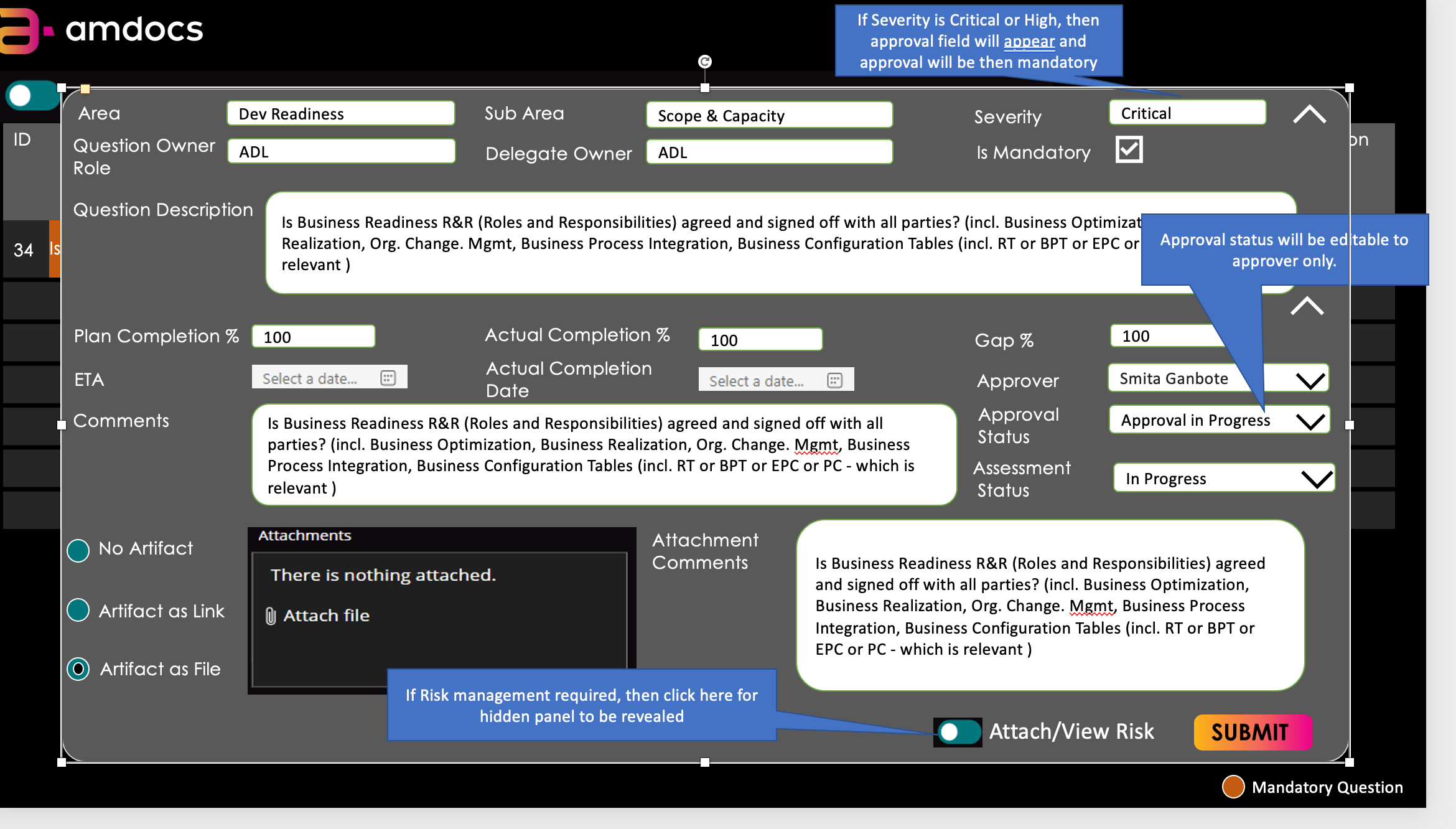
Original product sketch: Users had to fill dense panels with stacked forms and tables for checkpoint assessments- too cramped, no clear sequence, and required manual matching post-entry.
My redesign

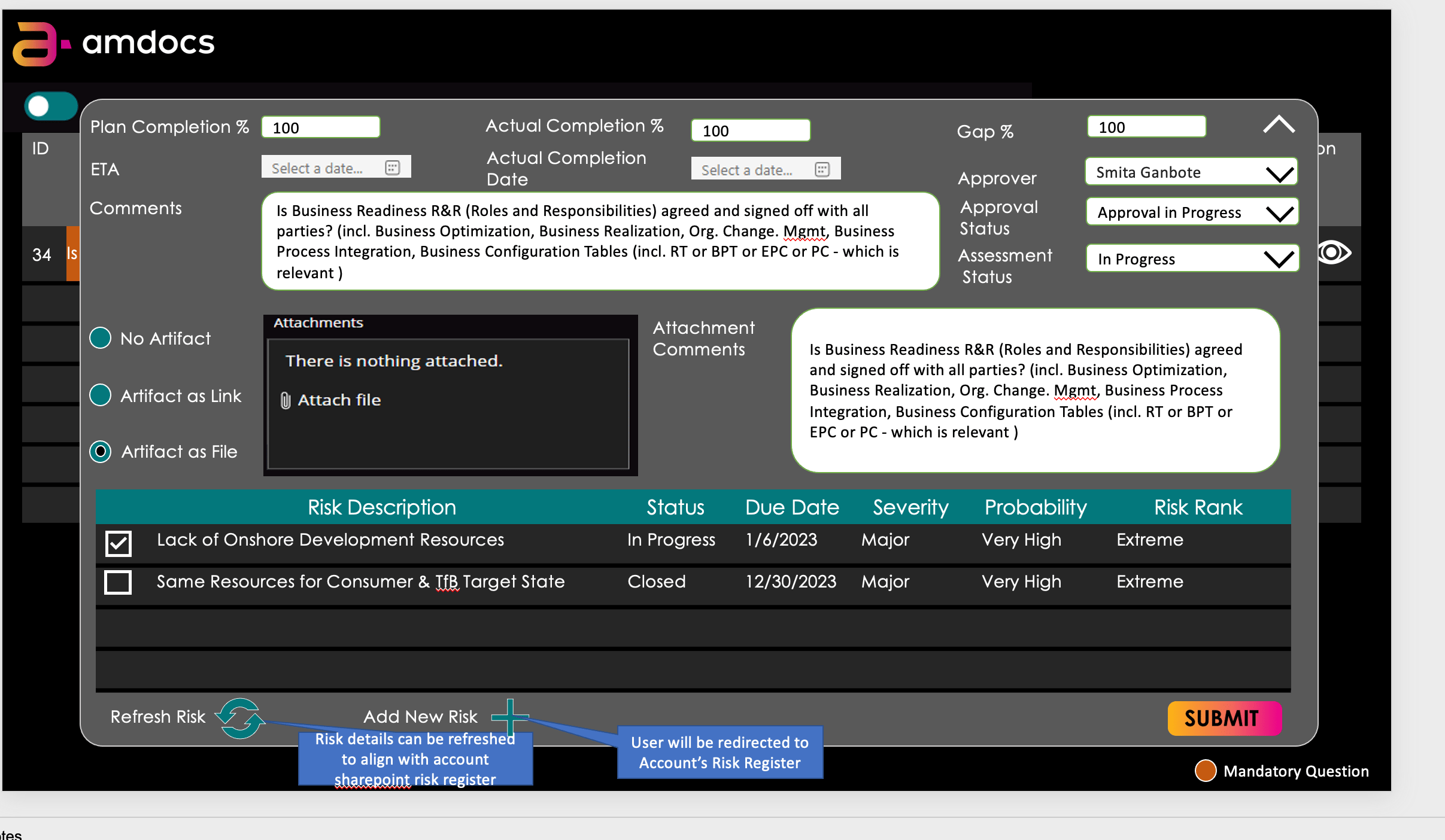
Turned this into a guided 3-step flow: input → auto-validation → smart linking with previews, making assessments intuitive and error-proof.

Checkpoint Management Assessment

Details

Area

Dev Readiness

Sub Area

Scope & Capacity

Severity

Critical

Delegate Owner

ADL

Question Owner Role

ADL

Question Creator

Tom Hirsh

Question Description

Is Business Readiness R&R (Roles and Responsibilities) agreed and signed off with all parties? (incl. Business Optimization, Business Realization, Org. Change. Mgmt, Business Process Integration,Business Configuration Tables (incl. RT or BPT or EPC or PC - which is relevant )

Is Mandatory

Assessment

Planned Completion %

100

Actual Completion %

100

Gap %

100

Approver

Select Date

Approval Status

Approval in Progress

Assessment Status

In Progress

ETA

Select Date

Actual Completion Date

Select Date

Comments

Is Business Readiness R&R (Roles and Responsibilities) agreed and signed off with all parties? (incl. Business Optimization, Business Realization, Org. Change. Mgmt, Business Process Integration,Business Configuration Tables (incl. RT or BPT or EPC or PC - which is relevant )

*

Approver Comments

Is Business Readiness R&R (Roles and Responsibilities) agreed and signed off with all parties? (incl. Business Optimization, Business Realization, Org. Change. Mgmt, Business Process Integration,Business Configuration Tables (incl. RT or BPT or EPC or PC - which is relevant )

*

Approver Comments

Is Business Readiness R&R (Roles and Responsibilities) agreed and signed off with all parties? (incl. Business Optimization, Business Realization, Org. Change. Mgmt, Business Process Integration,Business Configuration Tables (incl. RT or BPT or EPC or PC - which is relevant )

PLS provide a reason

No Artifact

Artifact as Link

Artifact as File

Risk Management

Present Risks

Save Changes

UX/UI Design Decisions

Overview first, details on demand—executives stay high-level while PMOs drill into specifics when needed.

Color-coded indicators let users scan dozens of projects in seconds and spot critical issues instantly.

Pre-populated checkpoints and dropdowns minimize manual entry and cognitive load during setup.

Clear hierarchy with alternating rows, filters, and right-aligned actions for quick scanning and decisions.

Entry Screen

This entry screen is designed to set context, build confidence, and guide users into action with minimal friction.
Dashboard:

This dashboard exists to give executives and PMOs a single place to see milestone health and delivery risk across all active projects, so they can intervene early, prioritize decisions, and keep the portfolio on track

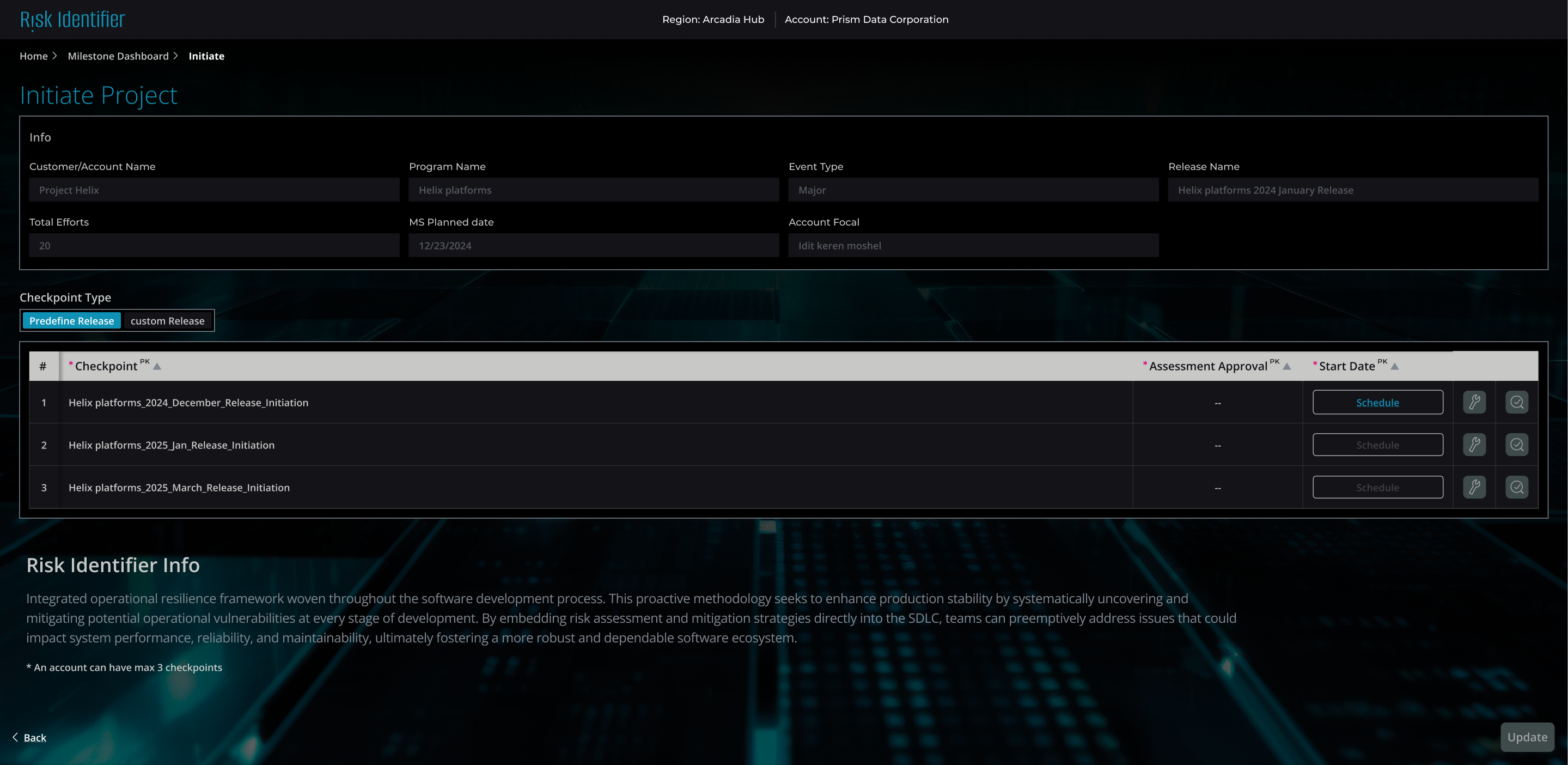
Setting Up a Project Checkpoint:

This screen is designed to help users initiate a project checkpoint quickly, accurately, and with minimal cognitive load.

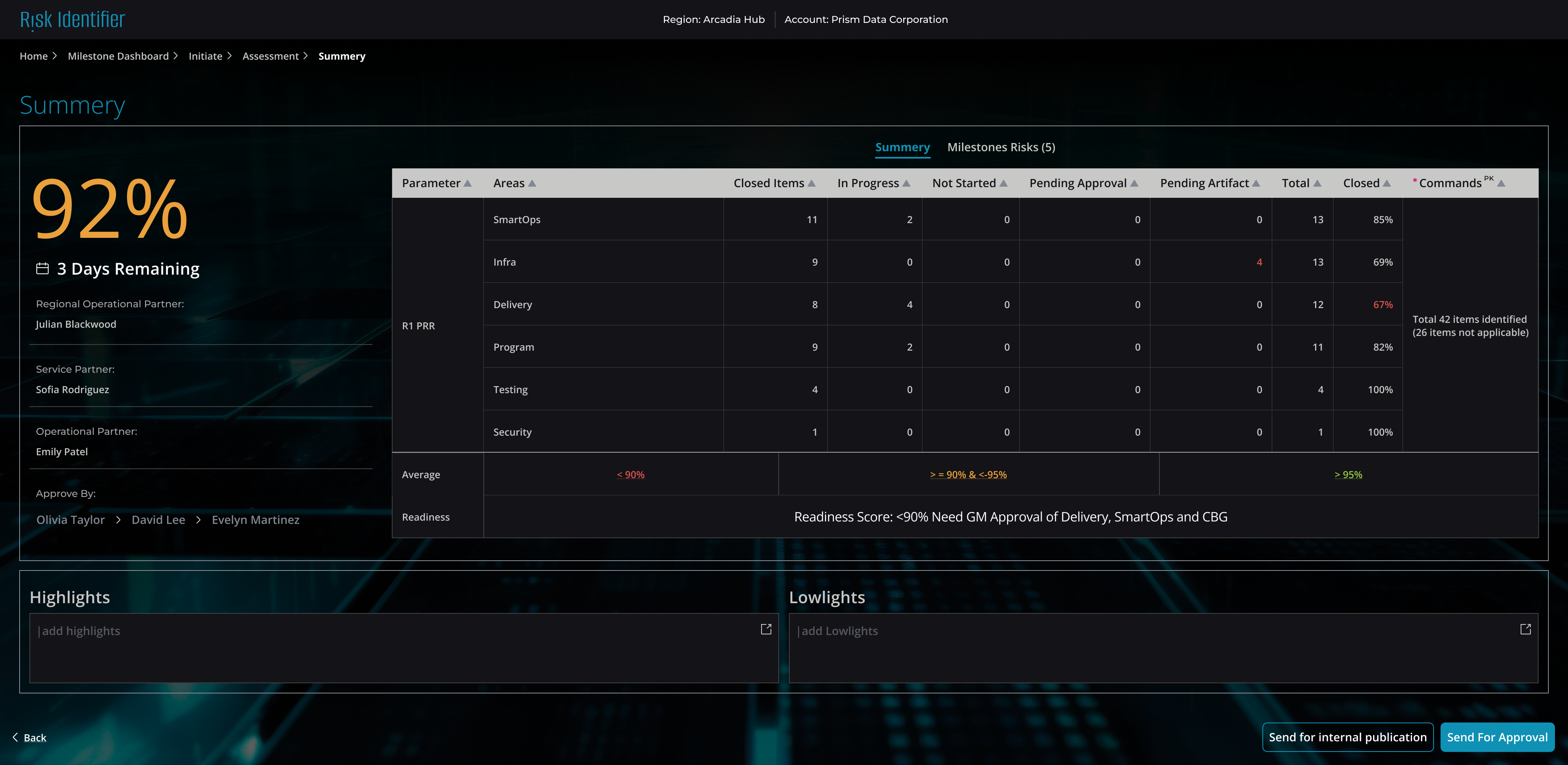
Summary & Readiness View:

Gives executives a quick overview of all projects at a glance. Drill down for details when needed.

Outcome

  • Reduced Risk Discovery Time
  • Proactive Resource Allocation- resources (architects, QA) are assigned before deadlines slip, not after—preventing last-minute firefighting and budget overruns.
  • Single Source of Truth--Eliminated fragmented status updates across multiple Excel files and email chains
  • Improved Stakeholder Confidence